
"Microsoft is improving how it works to make it more secure and easier to manage long‑term."
Microsoft is changing how files are shared with people outside your organisation in SharePoint and OneDrive.
If you work with external suppliers, partners, contractors, or clients, this change may affect you — particularly if you’ve shared files in the past using email links.
The good news is that external sharing is not being removed. Instead, Microsoft is improving how it works to make it more secure and easier to manage long‑term.
This article explains what’s changing, when it’s happening, the pros and cons, and what to do if an external link stops working.
What’s changing with external file sharing in SharePoint and OneDrive?
Many organisations have historically allowed staff to share files with specific external people, but did not allow users to add guest accounts themselves.
In these environments, external access often worked like this:
• Staff could share a file with a specific email address
• The external person received a one‑time passcode by email
• No guest account was created unless IT approved and set one up manually
Microsoft’s change removes this middle ground by retiring this one‑time passcode method.
Going forward, all external users will access shared files using a guest account. This guest access is managed through Microsoft Entra, Microsoft’s identity and security platform. So if we allow people to share files externally, Microsoft will now create guest access automatically — and that access will be managed like any other user identity.
This means external users will sign in, rather than relying on temporary email codes.

What’s changing with external file sharing in SharePoint and OneDrive?
Benefits of the new guest access approach
• Improved security: Guest access is more secure than email passcodes and allows organisations to apply consistent security and access rules to external users.
• Clearer control over shared files: It becomes easier to understand who has access to files and to remove access when it’s no longer needed.
Better long‑term management: Guest access allows organisations to manage external collaboration more cleanly over time, rather than relying on old links that may still exist in inboxes.
Downsides to be aware of
• Some older links may stop working. External users may report that a SharePoint or OneDrive link they previously used no longer works after July 2026. This is expected for links that relied on the old one‑time passcode system.
• External users may need to sign in: Instead of entering a quick email code, external users may need to sign in using their email address. For some people, this may feel like an extra step.

When are these SharePoint and OneDrive sharing changes happening?
Microsoft is rolling this change out gradually:
• From May 2026 New files shared with external users will automatically use guest access. In most cases, the guest account is created automatically when you share a file or folder.
• From July 2026 Older sharing links that relied on one‑time passcodes may stop working if the external person does not already have a guest account.
• By 31 August 2026 The one‑time passcode system will be fully retired across Microsoft 365.
What this change means for sharing files with external users
Microsoft is improving how external file sharing works in SharePoint and OneDrive.
• External sharing is not being removed
• Security is being strengthened
• If an older link breaks in mid‑2026, re‑sharing the file usually fixes the issue
For small organisations
If you’re a small organisation without a dedicated IT team, this change can sound more worrying than it actually is. The key thing to know is that you don’t need to actively manage guest accounts day‑to‑day.
Here’s what will make life easier:
• Accept automatic guest access
If you allow staff to share files externally, Microsoft will now create guest access automatically. This removes the need for manual setup or IT involvement.
• Consider limiting sharing externally
If you need a tighter control over this you could:
○ allow only some people to share externally - like specific people (for example, project leads or managers), or
○ allow sharing only on specific SharePoint sites used for external work.
This keeps guest access manageable without completely blocking collaboration: but only do it if it fits with the way the organisation needs to work.
• Set Guest Access to expire automatically at the tenant level
When automatic expiry is enabled, external users lose access to shared files after a set period of time. Their guest account is not automatically deleted and access can be restored easily by re‑sharing if needed. You can set that up at the tenant level in the SharePoint admin centre:
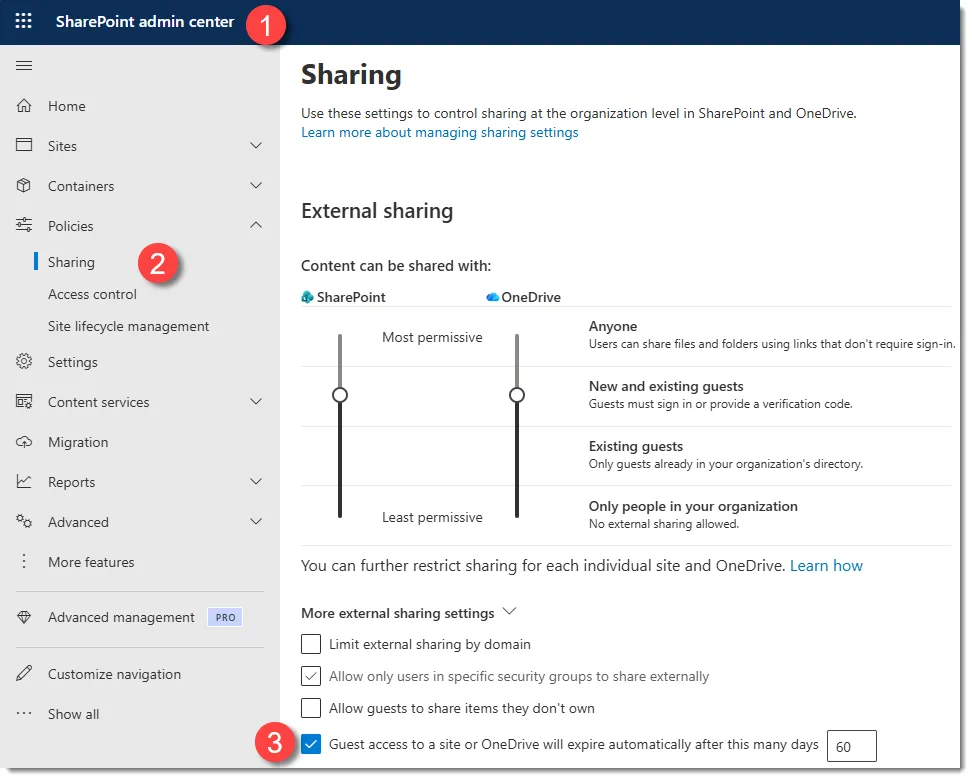
• There are some other good suggestions to consider in this article: Create a more secure guest sharing environment, and if you want to back to basics to get a better understanding about external sharing, refer to this set of articles: Collaborating with people outside your organisation
• Periodically review the Guest accounts in your tenancy and clean it up as necessary (every year or couple of years would probably be adequate for a small organisation). Check out this Microsoft resource to learn how to manage external identities: Implement and Manage External Identities
What shall I tell my staff about this change?
Here's a short communication you can send out to explain what's happening to end users:
What’s changing with sharing files externally?
From mid‑2026, Microsoft is changing how people outside our organisation access SharePoint and OneDrive files.
What does this mean for you?
○ When you share files with external people, they’ll use a guest account instead of a one‑time email code.
○ New sharing will mostly “just work” — Microsoft creates the guest access automatically.
○ Some older sharing links may stop working from July 2026.
What might you notice?
○ An external person might say they’ve lost access to a file.
○ The fix is simple: re‑share the file with them.
What don’t you need to worry about?
○ You don’t need to change how you share files today.
○ Nothing is broken right now.
In short:
External sharing is becoming more secure. If an old link stops working later in 2026, re‑sharing fixes it.
And here's one for your IT/Admin staff:
Microsoft is retiring SharePoint One‑Time Passcode (OTP) authentication and moving all external sharing to Microsoft Entra B2B guest accounts.
Timeline
○ May 2026:
New external sharing transitions to Entra B2B. Guest accounts are auto‑created for new invites.
○ July 2026:
OTP authentication retires. External users without guest accounts will see access denied on previously shared “specific people” links.
○ By 31 August 2026:
Retirement completed.
Impact
○ EnableAzureB2BIntegration setting will no longer apply.
○ Entra B2B becomes mandatory for external access.
○ External users are fully subject to Entra Conditional Access and guest governance.
○ Authentication and audit events move to Entra logs.
Recovery / mitigation
○ Re‑sharing content automatically provisions guest accounts and restores access.
○ Guest accounts can also be pre‑created if needed.
○ No mandatory admin action required, but proactive comms are recommended.
Recommended actions
○ Notify users about potential access issues for older links from July 2026.
○ Ensure Email OTP for Entra B2B is enabled if relied upon.
○ Use Entra access reviews or expiry policies to remove guest access that is no longer needed and reduce long‑term directory clutter
○ Review guest Conditional Access and external sharing policies.
Frequently asked questions about external file sharing in Microsoft 365
• Why are my SharePoint or OneDrive sharing links no longer working?
Some older links relied on a one‑time passcode system that Microsoft is retiring. Re‑sharing the file usually restores access by creating guest access automatically.
• Do I need to stop sharing files with external users?
No. External file sharing in Microsoft 365 is still supported and widely used. Only the way external users sign in is changing.
• Do I need to create guest accounts myself?
No. In most cases, guest access is created automatically when you share a file or folder with an external user.